Private Browsing on Fire Stick: Best VPNs and Settings

Amazon Fire Stick is one of the most popular streaming devices. It turns almost any television into a smart TV and provides access to apps like Netflix, Prime Video, Hulu, Disney+, and more. While streaming is enjoyable and easy, many users do not think about the privacy aspects of these activities. Your internet service provider (ISP) may monitor your internet traffic, streaming platforms may collect information about your usage, and some third-party services may also track your activity. This is where Private Browsing on Fire Stick and VPN use come into play.
Private Browsing on Fire Stick helps limit the information stored locally on your device, while a VPN can encrypt your internet traffic and hide your IP address from websites and your ISP. Together, these tools can help improve your privacy and security while using your Fire Stick.
This article explains the need for private browsing, shows you how to use a VPN effectively on Fire Stick, and helps you understand what to look for when choosing the best VPN for Fire Stick.
What Does Private Browsing on Fire Stick?
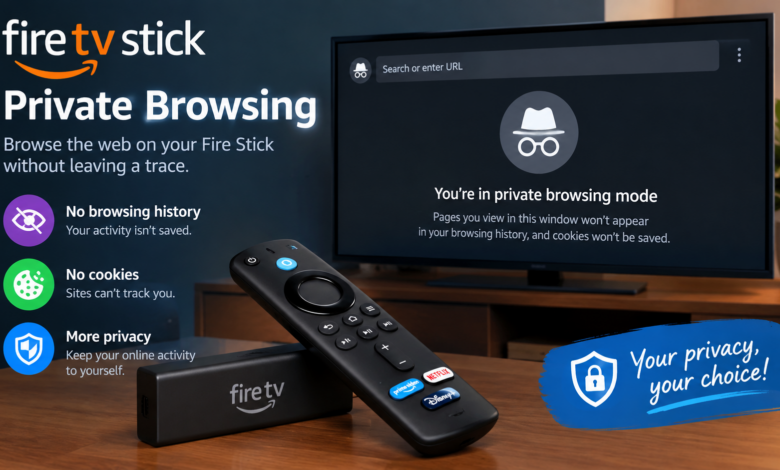
When you use a web browser on your computer or phone, you have probably come across Incognito Mode or Private Window. This feature generally does not store your browsing history, cookies, or search terms after the private session ends. However, private browsing does not make your activities invisible to your internet provider, network administrator, or the websites you visit.
The Fire Stick does not offer a universal private browsing mode like some desktop and mobile browsers. However, you can improve your privacy by using a supported browser’s private mode, where available, and connecting to a VPN.
A VPN, or virtual private network, encrypts your internet traffic and routes it through a secure server in another location. It can hide your real IP address from websites and help prevent your ISP from seeing the specific websites you visit or the contents of your encrypted traffic. However, a VPN does not make you completely anonymous, and streaming platforms may still collect information about your account and activity.
Using a VPN may also help you access content that is available in other regions, provided the service permits it. For example, some apps or shows may only be available in a specific country. Connecting to a VPN server in that country can sometimes change the region associated with your IP address, although streaming services may detect and block VPN connections.
Why You Should Use a Private Browsing on Fire Stick
Many people think that only hackers or tech experts use VPNs. The truth is that anyone who values online privacy can benefit from using one, especially when streaming content on devices like Fire Stick.
Protect Your Online Privacy
One of the biggest reasons to use VPN protection is privacy. Without a VPN, your internet provider may be able to see information about your online activity, including the services you connect to and the amount of data you use. Depending on local laws and the provider’s policies, this information may be used for network management, analytics, or other purposes.
A VPN encrypts your internet traffic and routes it through a secure server. This helps prevent your ISP from seeing the specific websites you visit or the contents of your encrypted traffic. It also replaces your public IP address with the IP address of the VPN server, making it harder for websites to determine your actual location.
Access Regional Content
Another benefit of using a VPN is the ability to work around some geographic restrictions. Many streaming platforms offer different content libraries in different countries. Connecting to a VPN server in another region may allow you to access content that is available there, although results vary by service and VPN provider.
Secure Public Wi-Fi Connections
If you travel away from home and connect your Fire Stick or another device to public Wi-Fi networks in hotels, airports, or other locations, your data may be exposed to certain network risks. A VPN can help protect your connection by encrypting your internet traffic, making it more difficult for others on the same network to intercept it.
Features to Look for in the Best VPN for Fire Stick
Not all VPNs are created equal. Some perform better on Fire Stick than others. To achieve smooth streaming and strong privacy, it is important to choose a VPN that works well with your device and meets your needs.
Dedicated Fire Stick App
One of the first things to check is whether the VPN has an app made specifically for Fire Stick. This is usually the simplest method for installation and use. You can search for the app in the Amazon Appstore and install it directly on your device.
Fast and Stable Connections
Speed is another important consideration. To stream high-definition or 4K video, you need both speed and stability. Some VPNs may slow down your internet connection, causing buffering, poor video quality, or interruptions. Look for a provider with fast servers and reliable streaming performance.
Strong Privacy and No-Logs Policy
Privacy is one of the main reasons to use a VPN. Look for a provider with a clear and strict no-logs policy. This means the company should explain what information it collects and how it handles your data. Independent audits can also provide additional confidence in a provider’s privacy claims.
Server Locations
The number of servers and server locations also matters. A VPN with servers in many countries gives you more options for finding a faster connection and accessing content that is available in different regions. However, the number of servers alone does not guarantee better performance.
Customer Support
Reliable customer service is always worth considering. Choose a VPN provider that offers helpful support through live chat, email, or a detailed knowledge base, especially if you need assistance installing or troubleshooting the app on your Fire Stick.
Best VPNs for Fire Stick in 2025
If you are looking for the best VPN for Fire Stick, here are a few well-known options that are widely used for streaming and online privacy.
ExpressVPN
ExpressVPN is often considered one of the best VPNs for Fire Stick because of its fast speeds, privacy features, and easy-to-use app. It offers a dedicated Fire TV app, a large network of servers in many countries, and a strict no-logs policy. ExpressVPN is compatible with major streaming platforms, although access to specific services can vary by location and may change over time.
NordVPN
NordVPN is another popular VPN that works well with Fire Stick. It offers a dedicated Fire TV app, a large server network, and advanced features such as Double VPN and threat protection tools. The app is simple to use, and NordVPN is known for its security features and privacy-focused policies. Streaming compatibility may vary depending on the platform and region.
Surfshark
Surfshark is a popular budget-friendly option. It has a clean interface for Fire Stick and supports unlimited simultaneous connections under a single subscription, subject to its terms. Surfshark offers fast connections, streaming support, and tools such as CleanWeb to help block ads and trackers.
How to Install and Use a VPN on Fire Stick
Installing a VPN on Fire Stick is simple. Even if you are not very tech-savvy, you can follow these steps to get started.
Choose and Subscribe to a VPN
First, choose a VPN from the list above and subscribe to a plan. Consider its speed, privacy policy, server locations, Fire Stick compatibility, and streaming performance before making your decision.
Search for the VPN App
Turn on your Fire Stick and go to the home screen. Use the search function to look for your chosen VPN app. Once you locate it, select the app and choose Download or Get.
Sign In to Your Account
After the app has been installed, open it and sign in with your account details. The app may request permission to establish a VPN connection. Follow the on-screen instructions to allow the connection.
Connect to a VPN Server
The app should display a list of available server locations. Choose a server based on your preferred location or connection speed, then select Connect. Once the connection is established, the app should indicate that you are connected.
Start Streaming
Once you are connected, your Fire Stick’s internet traffic will be routed through the VPN. Open your streaming apps and enjoy your content with an additional layer of privacy and security. Remember that a VPN does not guarantee access to every streaming service or bypass every geographic restriction.
Settings for Better Privacy on Fire Stick
In addition to using a VPN, there are a few settings you can review on your Fire Stick to improve your privacy.
Review Privacy Settings
From the Fire Stick home screen, navigate to Settings. Depending on your Fire OS version, select Preferences and open Privacy Settings. You may find options such as Device Usage Data and Collect App Usage Data.
These settings control whether certain usage information is shared with Amazon. Review the available options and disable data collection settings you do not want to use, where the options are available on your device.
Review Data Monitoring
You can also return to Preferences and open Data Monitoring. If you do not need usage monitoring, you may choose to disable it. Menu names and available settings can vary depending on your Fire OS version.
Keep Your Fire Stick Updated
It is also a good idea to check for software updates regularly. Fire Stick system updates and VPN app updates may address bugs, improve performance, and strengthen security. Keeping your device and apps updated helps ensure that you are using the latest available protections.
Final Thoughts
Streaming on your Fire Stick is an excellent way to enjoy movies, shows, and other content, but it is also important to remain aware of your privacy and security. Using a VPN can help encrypt your internet traffic, hide your IP address, and provide an additional layer of privacy while streaming.
Whether you choose ExpressVPN, NordVPN, or Surfshark, each option offers a balance of speed, security, and ease of use. The right choice depends on your budget, streaming needs, preferred server locations, and privacy requirements.
With a quality VPN service and the relevant privacy settings adjusted on your Fire Stick, you can enjoy a more private and secure streaming experience. Choose the best VPN for Fire Stick, review its features carefully, and stream smart.
For more information visit on our website : Dolphin Techknology