
Printing a 30-page report is not exactly anyone’s idea of an exciting afternoon. If your printer takes forever to respond, produces messy text, or constantly asks for attention, even a simple printing task can become frustrating. This is one reason a Canon Laser Printer can be a useful choice for people who print documents regularly.
Laser printers are especially popular for paperwork because they use toner-based printing rather than liquid ink. They can be a good fit for office documents, schoolwork, invoices, forms, reports, and other everyday files where clear text and efficient printing matter more than photo-quality colours.
Before making a purchase, it is worth understanding how Canon laser printers work, what makes them different, how fast they print, and what you can expect to spend after buying one.
Let’s start with the basics…
What is a Canon Laser Printer?
A Canon Laser Printer uses laser-based imaging technology and toner to produce printed documents. Canon produces laser printers for different environments, including homes, small offices, and workplaces with heavier printing requirements.
The main difference between a laser printer and an inkjet printer is the printing method. Instead of applying liquid ink directly to the paper, a laser printer uses toner powder along with an imaging system to transfer the print onto the page.
This technology makes laser printers particularly suitable for people who print documents frequently. They are commonly used for text-heavy work where consistent and readable output is important.
Why choose a Canon Laser Printer?
A printer should make your work easier, not become another task on your to-do list. This is where laser printing can make sense for regular document users.
If you mostly print black-and-white paperwork, a monochrome laser printer can provide exactly what you need without paying for colour features you may rarely use.
On the other hand, if your work includes presentations, charts, branded documents, or other colour materials, a colour laser model may be more suitable.
Canon also has models with different sizes and capabilities, so you can choose according to your workload rather than simply buying the biggest printer available.
A laser printer may be worth considering if you:
- Print documents several times a week.
- Need clear and readable text.
- Regularly handle multi-page files.
- Want a printer that can fit into an office environment.
- Need wireless printing.
- Want scanning and copying in the same device.
- Prefer toner-based printing for your regular workload.
The right printer depends less on the brand name and more on what you actually print.
What makes Canon Laser Printers useful?
A laser printer can be particularly convenient when your printing routine involves lots of paperwork rather than occasional photographs.
Clear document printing
Text-heavy files can benefit from the crisp output associated with laser printing. This is useful for contracts, reports, invoices, forms, letters, and other professional documents.
Efficient document handling
Laser printers are designed with regular document printing in mind. This can make them a practical option when your printer is used frequently rather than sitting quietly on a desk for weeks.
Convenient connectivity
Depending on the model, you may be able to connect your Canon laser printer through USB, WiFi, Ethernet, or other supported connection options. Wireless connectivity can be particularly useful when several computers or mobile devices need access to the same printer.
Multiple functions
A multifunction Canon laser printer can combine printing, scanning, and copying in one device. For a home office or small business, this can be more convenient than keeping separate machines for each job.
What are the different Canon Laser Printer options?
Not every laser printer is built for the same purpose. Understanding the main categories can make your search much easier.
Monochrome Canon Laser Printers
A monochrome printer focuses on black-and-white output. This is a sensible option if your daily printing consists mainly of text documents. You may not need colour at all for invoices, letters, reports, receipts, forms, or assignments.
Colour Canon Laser Printers
Colour laser printers are designed for users who need more than black text. They can be useful for documents containing colour charts, graphs, logos, presentations, and other business materials where colour adds useful information or branding.
Multifunction Canon Laser Printers
A multifunction model can handle several everyday office jobs from one machine. Depending on the model, you may be able to print documents, make copies, scan paperwork, and perform additional tasks.
Compact Canon Laser Printers
Some laser printers are designed to take up less space, making them more practical for bedrooms, study areas, small desks, and home offices. If you have limited room, check the printer’s actual dimensions and remember to leave enough space around it for ventilation, paper loading, and access to toner.
What are the advantages of using a Canon Laser Printer?
The biggest benefit of a laser printer is that it can be well suited to regular document printing. But there are several other reasons you might prefer one.
Here are some advantages to consider:
- Suitable for frequent document printing.
- Sharp text output.
- Fast printing on compatible models.
- Toner-based printing.
- Wireless options available on selected models.
- Scanning and copying on multifunction versions.
- Automatic duplex printing on selected models.
- Colour printing available on compatible models.
- Suitable options for both home and office environments.
Of course, a printer can only be as useful as the way you use it. Buying an advanced office model for occasional printing may not provide much value.
How to choose a Canon Laser Printer for home?
Home printing needs can vary quite a bit. One person may print a few forms each month, while another may regularly print schoolwork, business documents, shipping labels, and paperwork.
Start by looking at your monthly printing habits.
If you mainly need black-and-white documents, a basic monochrome printer could be enough. If you occasionally need colour, consider whether a colour model is worth the additional cost.
If your home printer also needs to scan or copy documents, a multifunction model can save you from purchasing another device.
For a home office, WiFi can also make life easier because you can place the printer where it is convenient rather than keeping it directly beside your computer.
How to choose a Canon Laser Printer for a business?
Business printing usually demands more from a printer. Before buying, consider how many pages your team prints and how many people will be using the machine. A printer designed for light personal use may struggle to meet the demands of a busy workplace.
For business use, pay attention to:
- Recommended monthly print volume.
- Print speed.
- Paper tray capacity.
- Network connectivity.
- Automatic duplex printing.
- Scanning and copying.
- Toner yield.
- Colour requirements.
- Security and administrative features where relevant.
If several employees share one printer, network connectivity and paper capacity can become just as important as speed.
What features should you check before buying?
Printer specifications can quickly become overwhelming, especially when every model seems to have its own collection of numbers and abbreviations.
Focus on the features that will affect your everyday use.
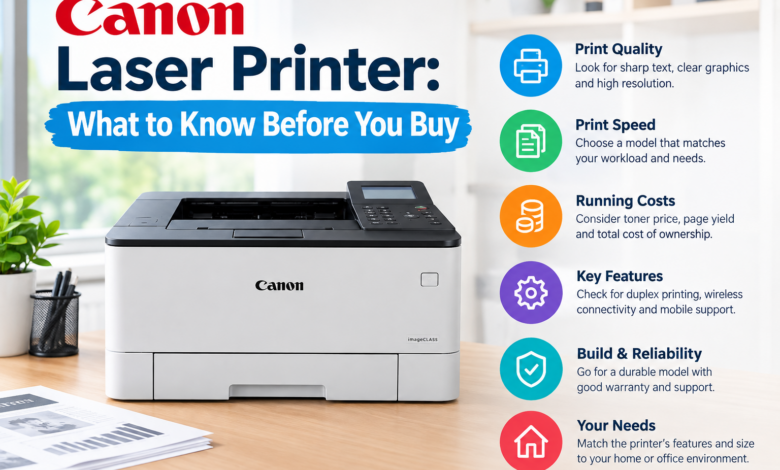
You need to check:
- Pages per minute.
- Black-and-white or colour capability.
- Maximum paper size.
- Paper tray capacity.
- WiFi and network options.
- Mobile printing compatibility.
- Automatic duplex printing.
- Scanner and copier availability.
- Toner cartridge yield.
- Recommended monthly print volume.
- Printer dimensions.
- Warranty and support.
You don’t need every available feature. You need the right combination of features for your workload.
How can you maintain a Canon Laser Printer?
Even a good printer needs basic care. Keeping the printer clean and using suitable paper can help prevent unnecessary printing problems.
Some simple maintenance habits include:
- Store paper somewhere dry and clean.
- Don’t overload the paper tray.
- Keep dust away from the printer.
- Use the correct toner for your model.
- Follow the manufacturer’s cleaning instructions.
- Keep the printer’s software updated when appropriate.
- Remove paper jams carefully.
- Give the printer enough ventilation.
If you notice faded text, lines, repeated marks, or other changes in print quality, check the toner and paper first. If the problem continues, consult the instructions or support resources for your particular model.
Final thoughts
A Canon Laser Printer can be a smart option when your everyday printing revolves around documents rather than photographs. With suitable models available for homes, home offices, and businesses, you can choose between simple monochrome printing, colour output, and multifunction features depending on what you actually need.
Before buying, look beyond print speed and the initial price. Think about toner costs, paper capacity, connectivity, monthly workload, scanning requirements, and the amount of space available for the printer.
Read More: www.dolphintechknology.com