Netflix error code M7111-1331-5059: how to fix VPN/proxy issue fast

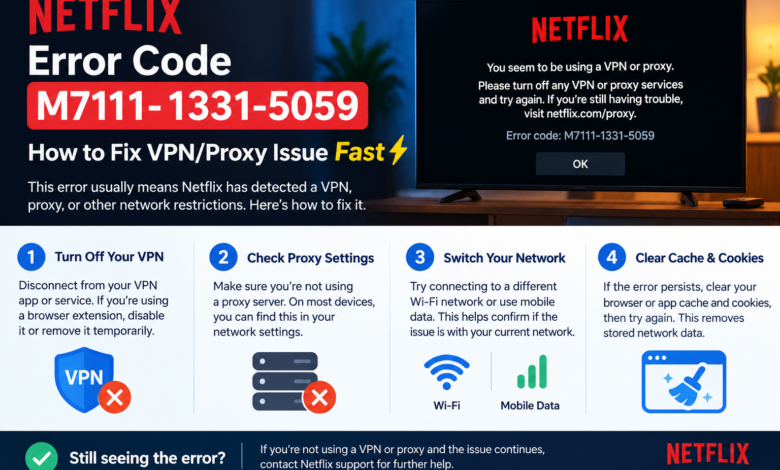
If you were just about to watch your favorite movie and suddenly you saw Netflix error code M7111-1331-5059, it can feel really annoying. This error usually pops up when Netflix detects that you are using a VPN or proxy service. Instead of playing your content, Netflix blocks access and shows this message on your screen.
The good news is that Netflix error M7111-1331-5059 is very common, and you can fix it quickly without needing any advanced technical knowledge. In most cases, it’s just a small network or browser-related issue that can be solved in a few simple steps.
In this blog, you will learn everything clearly and simply. You will get to know what Netflix error code M7111-1331-5059 means, why it happens, and how you can fix it fast. You just have to follow along step by step, and you should be back to streaming in no time.
What is Netflix error code M7111-1331-5059?
Netflix error code M7111-1331-5059 usually means that Netflix has detected a VPN, proxy, or unblocker being used on your network.
Instead of loading your show, Netflix blocks access because of content licensing rules. This is why you see the error message asking you to turn off your VPN or proxy.
You may face the Netflix error M7111-1331-5059 on the following devices:
- Web browsers like Chrome, Edge, or Firefox.
- Laptops and desktops.
- Smart TVs (in some cases).
- Streaming devices.
Why does Netflix error code M7111-1331-5059 happen?
Understanding the cause can help you fix the issue faster.
Here are the most common reasons:
Reason 1: Using a VPN or proxy
Netflix blocks many VPN services because they can easily bypass region restrictions.
Reason 2: Shared IP address
Some VPNs use shared IPs, and if Netflix flags that IP, you may see Netflix error code M7111-1331-5059.
Reason 3: Browser extensions
Certain browser extensions can act like proxies and trigger Netflix error code M7111-1331-5059.
Reason 4: DNS or network settings
Custom DNS settings or misconfigured networks can also cause Netflix error M7111-1331-5059.
Reason 5: Cached browser data
Old or corrupted cache files may confuse Netflix and lead to errors.
How can you fix Netflix error code M7111-1331-5059?
Now, let’s get to the main part of fixing Netflix error code M7111-1331-5059.
Here are the easiest and most effective fixes you can try:
Fix 1: Turn off VPN or proxy
This is the most common solution.
To turn off the VPN or proxy, you have to:
- Firstly, disconnect your VPN completely.
- Secondly, disable any proxy settings on your device.
- Lastly, refresh Netflix.
Once done, you can open Netflix again and check if the Netflix error code M7111-1331-5059 is gone.
Fix 2: Switch to a different network
Sometimes your current network may be flagged.
To switch to a different network, you have to:
- Firstly, switching from WiFi to mobile data.
- Secondly, connecting to a different WiFi network.
- Lastly, restarting your router.
This can help you get a new IP address and fix the Netflix error M7111-1331-5059.
Fix 3: Disable browser extensions
Some extensions may act like VPNs without you realizing.
To disable your browser extensions, you have to:
- Firstly, open your browser settings.
- Secondly, go to extensions.
- Now, disable all extensions one by one.
- Lastly, restart your browser and then try Netflix again.
Fix 4: Clear browser cache and cookies
Old data can sometimes cause issues, such as clearing the browser cache and cookies.
To clear browser cache and cookies, you have to:
- Firstly, go to the browser settings.
- Secondly, find “Clear browsing data.”
- Now, select cache and cookies.
- Lastly, clear the data.
After that, restart your browser and open Netflix again.
Fix 5: Reset DNS settings
If you are using custom DNS, it may cause problems.
To reset DNS settings, you have to:
- Firstly, let DNS be automatic.
- Secondly, restart your device.
- Lastly, reconnect to your network.
Resetting DNS settings can help fix the Netflix error M7111-1331-5059 quickly.
Fix 6: Try a different browser
Sometimes the issue is browser-specific.
You can:
- Switch from Chrome to Edge or Firefox.
- Open Netflix in incognito mode.
- If it works in another browser, the issue is likely with your original browser.
Fix 7: Contact your VPN provider if you must use one
If you still want to use a VPN:
- Choose a premium VPN with streaming support
- Ask the provider for servers that work with Netflix
Free VPNs usually don’t work and often trigger Netflix error code M7111-1331-5059.
Can Netflix error code M7111-1331-5059 affect all devices?
No, Netflix error code M7111-1331-5059 is usually network-based, not device-based so it can not affect all your devices.
For example: It may appear on your laptop, but Netflix may work fine on your phone using mobile data, which means the issue is with your network or IP, not your account.
How can you prevent Netflix error code M7111-1331-5059 in the future?
Here are some simple tips you can follow to prevent Netflix error code M7111-1331-5059 from happening again in the future:
- Avoid using free VPNs or proxies.
- Use a stable and trusted internet connection.
- Keep your browser updated.
- Clear cache regularly.
- Avoid suspicious browser extensions.
These steps can help you avoid Netflix error M7111-1331-5059 in the future.
Is Netflix error code M7111-1331-5059 a serious problem?
No, Netflix error code M7111-1331-5059 is not serious.
It is:
- A common issue.
- Mostly related to VPN or network settings.
- Easy to fix within minutes.
You just need to follow the steps above, and you should be able to solve it quickly.
When should you contact Netflix support?
You should contact support under the following situations if:
- Netflix error M7111-1331-5059 keeps coming back
- You are not using any VPN, but still see the error
- The issue appears on all devices and networks
In such cases, there may be a deeper issue that needs help from Netflix support.
Final thoughts
Netflix error code M7111-1331-5059 can be frustrating, especially when you just want to relax and watch something. But the good part is that it is easy to fix. Most of the time, simply turning off your VPN or clearing your browser data will solve the problem.
You don’t need any technical skills. Just follow the steps one by one, and you should be able to fix the Netflix error M7111-1331-5059 quickly and get back to streaming without any interruptions.
FAQs about Netflix error code M7111-1331-5059
Q1: What does Netflix error code M7111-1331-5059 mean?
Ans: Netflix error M7111-1331-5059 means that Netflix has detected a VPN, proxy, or unblocker on your network and is blocking access.
Q2: How do I fix Netflix error M7111-1331-5059 quickly?
Ans: You can fix Netflix error M7111-1331-5059 by turning off your VPN, clearing your browser cache, and restarting your network.
Q3: Can a VPN cause Netflix error code M7111-1331-5059?
Ans: Yes, most VPNs can cause Netflix error M7111-1331-5059 because Netflix blocks many of them.
Q4: Will switching networks fix Netflix error M7111-1331-5059?
Ans: Yes, switching to a different network can give you a new IP and fix the Netflix error M7111-1331-5059.
Q5: Is Netflix error M7111-1331-5059 permanent?
Ans: No, Netflix error M7111-1331-5059 is a temporary issue and can be fixed easily with simple steps.
Read More: www.dolphintechknology.com