
A Canon Printer can make your everyday printing work much easier, whether you need to print documents at home, school assignments, family photos, or important office files. But with so many Canon printer models available, choosing one can sometimes feel like you are trying to solve a difficult puzzle.
You may be looking for a printer that can print quickly, connect to WiFi, scan documents, copy pages, or produce good-quality photos. Maybe you only need a simple printer for occasional use. Don’t worry… Canon has different types of printers for different printing needs.
Before you buy a Canon printer Guide, you should understand its main features, benefits, printer types, and running costs. This will help you choose a printer that actually fits your home or office instead of paying extra for features you may never use.
Let’s talk about the main things you should know…
What is a Canon Printer Guide?
A Canon Printer is a printing device made by Canon for home, office, photography, and professional use. Depending on the model, it can print documents and photos, scan pages, copy documents, and perform other tasks.
Canon offers different printer technologies, including inkjet, laser, photo, multifunction, and refillable ink-tank printers. This means you can find a model for occasional home printing as well as one designed for regular office workloads.
What are the key features of a Canon Printer?
Different Canon printers come with different features, but some functions are particularly useful for everyday users.
Wireless printing
Many Canon printers can connect to a wireless network, allowing you to print from computers, smartphones, and tablets without connecting a USB cable every time. This is especially helpful when several people in your home or office need to use the same printer.
Print, scan, and copy
Some Canon printers are multifunction devices. They allow you to print, scan, and copy documents from one machine. If you work from home or run a small office, having all these functions together can save both space and money.
Automatic duplex printing
Some models support automatic two-sided printing. This can help you save paper when printing longer documents, reports, assignments, and other files.
Note: Not every Canon printer supports automatic duplex printing, so check the specifications before purchasing if this feature is important to you.
Mobile printing
Compatible Canon printers can allow you to print from mobile devices using supported Canon apps or mobile-printing technologies. You can print photographs, documents, PDFs, and other files without transferring them to a computer first.
Automatic document feeder
An automatic document feeder, or ADF, can be useful when you need to scan or copy multiple pages. Instead of placing every page on the scanner glass separately, you can load several pages into the feeder and let the printer process them.
What are the benefits of using a Canon Printer?
A Canon Printer can be useful for both personal and professional printing because different models are designed around different needs.
Here are some common benefits:
- You can choose from compact home printers to larger office models.
- Many models support wireless printing.
- Multifunction printers can print, scan, and copy.
- Some models are designed for high-quality photo printing.
- Refillable ink-tank models can be useful for people who print frequently.
- Laser models can be suitable for regular document-heavy workloads.
- Mobile printing can make everyday printing more convenient.
- Duplex printing can help reduce paper consumption.
What are the different types of Canon Printers?
Canon has several types of printers, so you need to understand what each one is mainly designed to do.
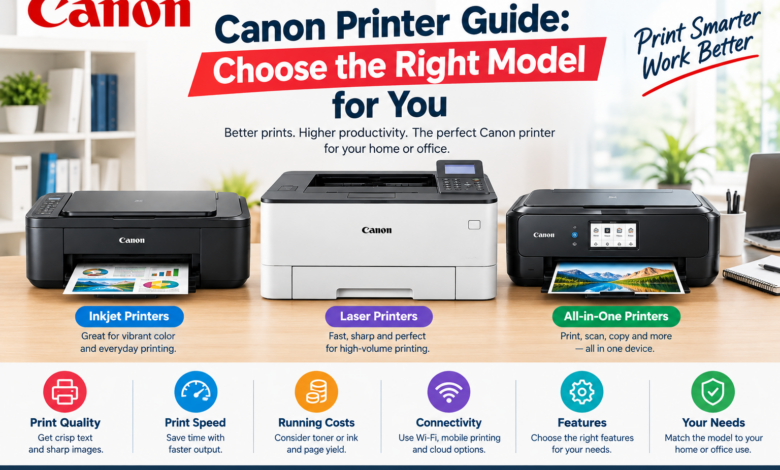
Canon inkjet printers
Inkjet printers are a common choice for homes because they can handle documents and colour images. They can also be useful if you occasionally print photographs. If your printing needs change from schoolwork to colourful presentations or family photos, a Canon inkjet printer can offer useful flexibility.
Canon laser printers
Laser printers are generally designed for users who print documents regularly. They use toner rather than liquid ink and are commonly used in offices and workplaces. If most of your printing consists of invoices, reports, forms, contracts, or other text-heavy documents, a laser printer may be worth considering.
Canon all-in-one printers
An all-in-one Canon Printer combines multiple functions into one machine. Depending on the model, you may get printing, scanning, copying, and faxing. This type of printer can be particularly useful for home offices and small businesses where desk space is limited.
Canon photo printers
If photographs are your main priority, a Canon photo printer may be more suitable than a basic document printer. These printers are designed to produce detailed colour images and can support different types and sizes of photo paper.
Canon MegaTank printers
MegaTank printers use refillable ink tanks rather than conventional ink cartridges. They can be a practical choice for people who print frequently. Instead of replacing a traditional cartridge every time the ink runs low, you refill the appropriate tank using compatible ink bottles.
Note: When comparing printers, don’t look only at the purchase price. You should also consider the price and expected yield of ink or toner.
How to choose the right Canon Printer for your home?
Choosing a printer for your home should start with one simple question: What do you actually need to print?
If you occasionally print documents, assignments, tickets, forms, or photographs, a compact multifunction inkjet printer may be enough.
If you print frequently, look for a printer with a larger ink capacity, efficient running costs, and features such as automatic duplex printing.
If photographs are important to you, focus more on colour quality, supported photo paper, and photo-printing capabilities.
Things to check before buying
- How many pages do you print every month?
- Do you need colour printing?
- Do you need scanning and copying?
- Do you want WiFi connectivity?
- Will you print photographs?
- Do you need automatic two-sided printing?
- What are the ongoing ink or toner costs?
Note: Don’t automatically choose the most expensive printer. The best Canon Printer for you is the one that matches your actual printing habits.
How to choose a Canon Printer Guide for office use?
Office printing is usually different from home printing. You may need to print more pages, handle several documents at once, and share the printer with multiple employees.
For regular office work, consider a model with faster print speeds, larger paper capacity, network connectivity, and an automatic document feeder.
A laser printer can be a good option when most of your work involves high-volume document printing. However, a high-capacity ink-tank printer may also make sense when colour printing is important.
If employees need to scan and copy documents regularly, an all-in-one model can make everyday office tasks easier.
How to maintain your Canon Printer?
Once you have purchased a Canon Printer, proper maintenance can help keep it working reliably.
- Use suitable paper for your printer.
- Keep the paper tray clean.
- Protect paper from moisture and excessive dust.
- Replace or refill ink and toner when required.
- Run the printer’s maintenance functions when print quality decreases.
- Keep the printer software and firmware updated when appropriate.
- Follow the instructions provided for your particular Canon model.
Common mistakes to avoid when buying a Canon Printer
Many people focus only on the printer’s initial price and forget about the cost of using it.
Before making your decision, don’t forget to check:
- Ink or toner replacement costs
- Expected printing volume
- Paper capacity
- Print speed
- Colour requirements
- WiFi and mobile compatibility
- Scanning and copying features
- Duplex printing support
A printer that costs less initially may not always be the cheapest option over several years if its consumables are expensive.
Final thoughts
A Canon Printer can be a useful choice for your home, home office, or workplace, but the right model depends on how you plan to use it. You should consider your printing volume, colour requirements, connectivity, scanning needs, print speed, and long-term ink or toner costs before making a decision.
If you print photographs and colourful documents, an inkjet model may be the better option. For frequent text-heavy office printing, a laser printer may suit you better. If you want printing, scanning, and copying in one machine, an all-in-one Canon Printer can be a convenient choice.
Take a little time to understand your actual needs before buying. Once you know what you expect from your printer, finding the right Canon Printer becomes much easier.
Read More: www.dolphintechknology.com