How to fix Netflix Error code UI-800-3 (2026 updated guide)

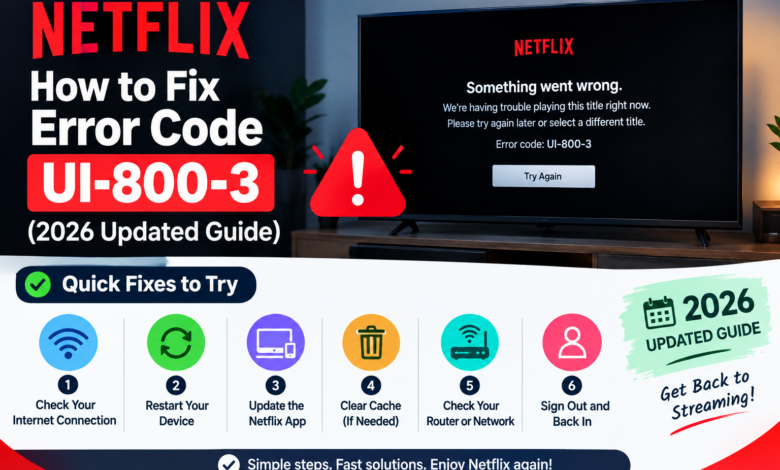
If you were ready to relax and watch your favourite show or movie, but when you open Netflix to binge, you got Netflix Error code UI-800-3 message, which can instantly kill your mood. This Netflix error usually shows up when Netflix has trouble loading saved data on your device.
Here’s the good part for you: Netflix Error code UI-800-3 is a very common error that everyone face and in most cases it can be fixed quickly without any tech knowledge.
In this blog, you will get to know everything in a simple way. You will get to know what the error means, why it happens, and the easiest ways to fix the Netflix Error code UI-800-3 step by step.
What is Netflix Error code UI-800-3?
Netflix Error code UI-800-3 means that there is some stored data on your device that needs to be refreshed. The stored data can be your cached files, cookies, or app data that has become outdated or corrupted.
Instead of playing your selected show, Netflix stops working and displays the error code on your screen.
You can find the Netflix Error code UI-800-3 message on the following devices:
- Smart TVs
- Streaming devices like Fire TV Stick or Roku.
- Gaming consoles like PlayStation or Xbox.
- Blu-ray players
It mostly happens on the apps rather than on browsers.
Why does Netflix Error code UI-800-3 happen?
Knowing why Netflix Error code UI-800-3 happens can help you a lot before fixing the issue. Here are the most common reasons behind Netflix Error code UI-800-3:
Reason 1: Corrupted app data
Over time, your device stores some temporary data to load Netflix faster, and if this data gets corrupted, it will cause Netflix Error code UI-800-3.
Reason 2: Outdated Netflix app
If your Netflix app is outdated, then it will not work properly with Netflix’s latest system.
Reason 3: Network connection issues
A weak or unstable internet connection can interrupt your Netflix and cause Netflix Error code UI-800-3.
Reason 4: Device glitches
Sometimes your device just needs a quick refresh. Small bugs or temporary issues can lead to Netflix Error code UI-800-3.
Reason 5: Account sync issues
If your account data is not syncing properly with the app, then Netflix Error code UI-800-3 can happen.
How can you fix Netflix Error code UI-800-3?
Now, let’s get to the real part. Here are some best and most effective fixes for you to easily solve Netflix Error code UI-800-3.
Fix 1: Restart your device
This is the most easiest and most effective solution.
To restart your device, you have to:
- First, turn off your device completely.
- Secondly, unplug your device from the power source.
- Now, wait for at least 1-2 minutes.
- Lastly, plug it back in, turn it on, and open Netflix to check if the error is gone or not.
Fix 2: Sign out and sign back in
Refreshing your account session can fix many issues, such as Netflix Error code UI-800-3.
To sign out and sign back in, you have to:
- First, open the Netflix app.
- Secondly, go to setting or menu.
- Now, select sign out.
- Lastly, log back in with your credentials.
Fix 3: Restart your internet connection
Sometimes the Netflix Error code UI-800-3 is not on your device but on your network.
To restart your internet connection, you have to:
- First, turn off your router.
- Secondly, wait for 1-2 minutes.
- Now, turn it back on.
- Lastly, reconnect your device and make sure your internet is stable before opening Netflix again.
Fix 4: Clear your Netflix app cache if available
Some devices allow you to clear your app data.
To clear your Netflix app cache, you have to:
- First, go to your device settings.
- Secondly, open Apps or Application Manager.
- Now, find your Netflix.
- Lastly, select clear cache or clear data.
Fix 5: Update the Netflix app
Using an outdated app can create many compatibility problems, such as Netflix Error code UI-800-3.
To update your Netflix app, you have to:
- First, open your device’s app store.
- Secondly, search for your Netflix.
- Now, check for updates.
- Next, install the latest version of Netflix.
- Lastly, after updating, you have to restart your app.
Fix 6: Reinstall your Netflix app
If none of the above fix works, then you have to reinstall your Netflix app.
To reinstall your Netflix app, you have to:
- First, delete your Netflix app.
- Secondly, restart your device.
- Now, install Netflix again from the app store.
- Lastly, log in again to your Netflix app.
Fix 7: Check your network settings
Your network setup can also affect your Netflix.
To check your network settings, you have to:
- First, avoid using a VPN or a proxy.
- Secondly, use a stable WiFi connection.
- Lastly, try switching to a different network if possible.
Can Netflix Error code UI-800-3 affect all your devices?
No, not really. Netflix Error code UI-800-3 cannot affect all your devices because this error is usually a device-specific error.
For example: Your Netflix may work fine on your phone, but can show Netflix Error code UI-800-3 on your TV.
This means that the Netflix Error code UI-800-3 issue is with the particular device, not in your Netflix account.
How can you prevent Netflix Error code UI-800-3 from happening again in the future?
Once you have fixed Netflix Error code UI-800-3, you don’t want to deal with it again. So, here are some simple habits you can try to avoid Netflix Error code UI-800-3 from happening again in the future.
You have to remember to:
- Always keep your Netflix app updated.
- Restart your device once in a while.
- Always avoid using unstable internet connections.
- Always clear your app data occasionally.
- Always avoid using unnecessary VPS services.
Is Netflix Error code UI-800-3 a serious problem?
No, not at all. Netflix Error code UI-800-3 can feel annoying, but it is not a serious issue, but a simple data refresh issue on your device.
In most cases, Netflix Error code UI-800-3:
- Is not related to your Netflix account.
- Is not a server problem.
- Can be fixed within minutes.
When should you contact Netflix support?
If you have tried everything and still see Netflix Error code UI-800-3, then now is the right time to contact support.
You should contact Netflix support when:
- Netflix Error code UI-800-3 keeps coming back.
- Netflix Error code UI-800-3 appears on multiple devices.
- Your Netflix app crashes frequently.
Final thoughts
If you see the Netflix Error code UI-800-3, then don’t worry at all. It is usually easy to fix. You just have to first try restarting your device, and if it doesn’t work, then sign out of the app and then sign back in. You may also need to reinstall your Netflix app. You just have to follow the above steps, and you will be streaming again in no time.
Read More: www.dolphintechknology.com