
Smart lighting such as Govee lights is mainly created to change how your home looks and how it feels. Many people prefer Govee lights compared to traditional lights because they are colorful, smart, and easy to control. If you just bought Govee lights for your home, you now need to understand how to install them for smooth performance. By the end of this blog, you will learn what tools you might need for installing Govee lights, how to set them up, problems you need to stay away from, and how you can get the best out of your Govee lighting system.
Let’s start with the basics…
What are Govee lights?
Before you start to install Govee lights, you need to know what Govee lights are and why Govee lights are so popular among people.
So, Govee lights are LED lighting products that can change colors, brightness, and effects in your place. Govee lights can be easily connected to your smartphone by using WiFi or Bluetooth through the Govee mobile app
Here’s where you can install Govee lights:
- Home decor
- Gaming room lighting
- TV backlighting
- Bedroom ambiance
- Party and mood lighting
Things you need before installing Govee lights
For a smooth installation of your Govee lights, you need to prepare the items you need during installation. Proper preparation before the installation makes it faster and cleaner.
Basic things you may need before installing your Govee lights:
- A Govee light kit, which contains an LED strip, a controller, and an adapter.
- A power outlet nearby
- A clean cloth or wipes
- Measuring tape
- Govee mobile app installed on your phone
- WiFi connection
Preparing the installation area beforehand is also important. You have to make sure that the surface you are planning to place your Govee lights on is clean, dry, and smooth, which will help the adhesive to stick properly.
Best places you should install your Govee lights
The important thing to do before you put up your Govee lights is to figure out where you want to put them. You need to think about what you want the Govee lights to do because where you put the Govee lights will change how they look. Different places for the Govee lights will make them look different.
Common and best placements for Govee lights installation are:
- Behind your TVs
- Under your desks
- Along your ceiling edges
- Behind your monitors
- Under your beds
- Along your shelves
Before you put up your Govee lights, it is a good idea to think about where they will go. This will help you avoid problems. You need to measure the space where you want to put the Govee lights and check if the LED strip that comes with your Govee kit’s long enough.
If you plan carefully and put the Govee lights in the place they will look nice and professional. Proper planning and placement of the Govee lights make a difference.
How should you clean your placement surface before installing Govee lights?
Cleaning the surface where you will put your Govee lights is the thing you need to do. A lot of people forget to do this. It is really important. You should clean the surface before you put up your Govee lights. If the surface is dirty and has oil on it the sticky part, on the Govee lights will not stick well.
Follow these simple steps for cleaning your placement surface before installation:
- Use a clean cloth or wipe to clean the surface.
- Remove dust, oil, or moisture.
- Let your placement surface dry completely.
- Never install lights on rough or textured surfaces.
Placement surfaces for your Govee lights installation are:
- Wood
- Plastic
- Glass
- Metal
- Painted walls
It will just take two or a few minutes to clean your placement area, which will later secure your Govee lights for years.
How can you install your Govee lights step-by-step?
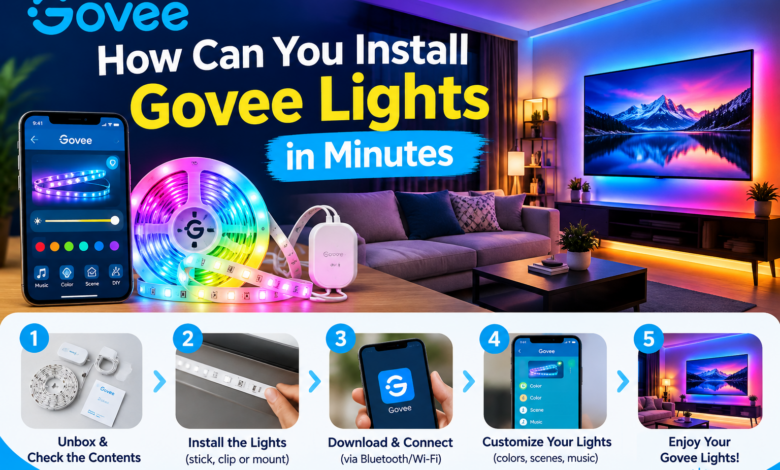
Now, let’s talk about the main step: Installing your Govee lights. Installation of your Govee lights is a simple process, and it will just take 10 to 20 minutes of your time.
Here is a step-by-step installation process for you:
Step 1: Test the lights
Before attaching the LED strip permanently, you must plug it into the power adapter and turn it on. It helps you to check that your Govee lights are working correctly before the installation.
Step 2: Connect the controller
Most Govee lights have a small control box. You have to connect your LED strip to this controller and then plug your light into the adapter.
Step 3: Start attaching the LED strip
To attach the LED strip, you have to peel off a small section of the adhesive backing. Now, slowly press the LED strip onto the selected clean surface.
Step 4: Secure the LED strip properly
Some Govee light kits have clips, and you can use them for extra support. You must use them in places where your strip loosens, such as in corners or vertical surfaces.
Step 5: Plug in the power adapter
Once the Govee LED strips are fully installed, you can connect the adapter to a close place.
If the LED strip is glowing, then you have successfully done the Govee lights installation.
How can you connect your Govee lights to the mobile app?
After you have just installed your Govee lights the next step, for you is to connect them to the Govee app. The Govee app will help you to control the colors, brightness and effects of your Govee lights.
Steps that you have to follow to connect your Govee lights to the mobile app:
- First, download the Govee Home app from your App Store.
- Secondly, turn on both your Bluetooth and WiFi.
- Next, you have to open the app and create an account on the app.
- Now, tap the Add Device button.
- Lastly, select your Govee light and follow the instructions on your screen.
Some amazing features you may get after connecting Govee lights include:
- Color-changing modes
- Brightness control
- Music sync lighting
- Timers and schedules
- Scene modes
The above features will make your Govee lights installation more interactive and fun.
Final thoughts
Installing Govee lights is quick and simple when you prepare the surface and follow the right steps. Once installed and connected to the Govee Home app, you can easily control colours, brightness, effects, and schedules for a smarter, more enjoyable lighting setup.
FAQs about Govee lights installation
Q1: How long will it take me to install my Govee lights?
Ans: Govee lights may take 10-20 minutes for installation, but it can vary depending on the area you want to cover.
Q2: Can I cut the Govee LED strip?
Ans: Yes, some of the Govee LED strips can be cut at the marked point. You have to check for the marked points and the instructions before cutting.
Q3: Can I reuse my Govee lights after removing them?
Ans: Yes, you can reuse your Govee lights after removing them, but remember that their adhesive may be weak, so you might need new adhesive clips to fix them.
Q4: Do my Govee lights need WiFi?
Ans: You Govee light may need WiFi for full smart features, but you can do the basic control via Bluetooth easily.
Q5: Are Govee lights safe to use?
Ans: Yes, if you have installed your Govee lights correctly and have connected them to the proper power outlets, then your Govee lights are safe for home use.
Read More: www.dolphintechknology.com